 |
Configure Microsoft Exchange
- Operating System: Windows 95
- Application: Microsoft Exchange
|
- Double-click My Computer.
- Double-click Dial-Up Networking.
- Double-click your Internet connection icon.
- Enter your username and password. (If not already there)
- Click the Connect button.
- Wait for Dial-up Networking to connect.
- Click the Start button.
- Click Run.
- In the Open field, type ftp
ftp.microsoft.com
- Click OK.
- At the User prompt, type ftp
- Press the Enter key.
- For the password, type your email address.
- Press the Enter key.
- Type cd /softlib/mslfiles
- Press the Enter key.
- Type bin
- Press the Enter key.
- Type get inetmail.exe
- Press the Enter key.
- Wait for inetmail.exe to download. Downloading the
file should only take about a minute.
- Type bye
- Press the Enter key.
- On the desktop double-click inetmail.
- This will install the Internet Mail Service for Windows
95. Do you wish to continue?
- Click Yes.
- Click Yes again.
- Microsoft Internet Mail Service Installation Complete
Successfully.
- Click OK.
- Close any applications that are still running and restart
your computer.
- Wait for the computer to restart.
- Make sure that the box to the left of Internet Mail
is checked.
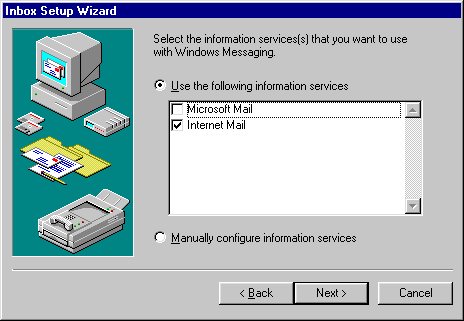
- Click Next.
- Make sure that Modem is selected.
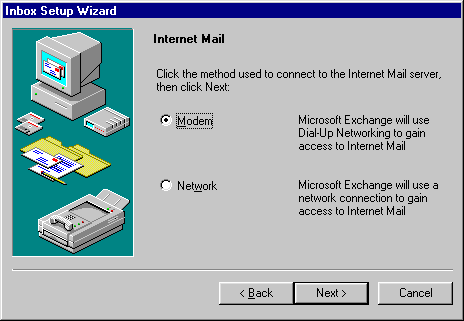
- Click Next.
- This window should be your Internet Connection. If not,
Click the down arrow and select your connection.
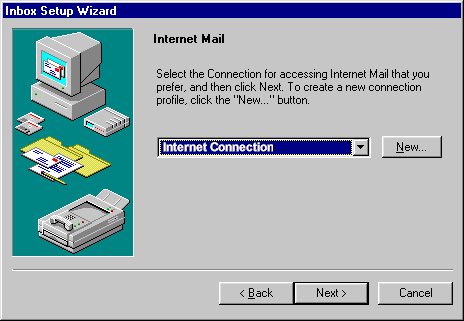
- Click Next again.
- In the field next to Specify the name, type
mail.yourdomain.com
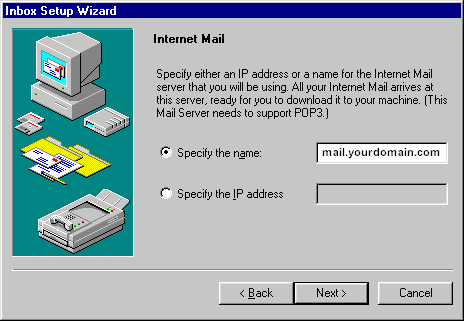
- Click Next.
- Click Next again.
- In the E-mail address field, type your email
address.
- The Your full name field can contain whatever you
want it to.
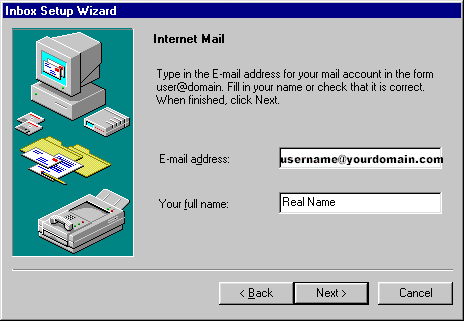
- Click Next.
- In the Mailbox name field, type your Domain username
(First 8 letters of Domain)
- In the Password field, type your password.
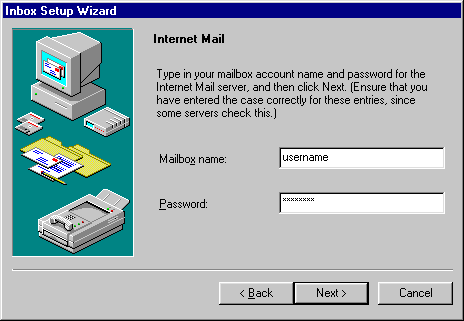
- Click Next.
- Personal Address Book.
- Click Next again.
- Personal Folders.
- Click Next again.
- When you see would you like to run Microsoft Exchange
when you start Windows 95? click Next.
- Click Finish.
- To send or receive messages, click Tools and select
Deliver Now.
|